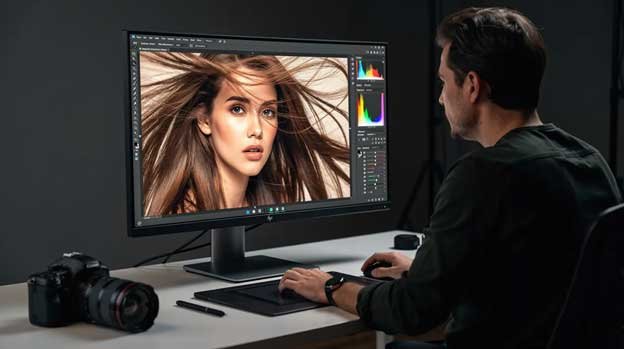
Clipping path and image masking are very common photo editing techniques used in Adobe Photoshop. Both methods are employed to isolate subjects from their backgrounds. However, the editing processes differ.
This guide is intended for any e-commerce seller, photographer or designer, who needs to process product images for professional purpose.
Choosing the right background removal technique can save your time and money. The right technique will keep you one step ahead by meeting the marketplace’s requirements.
What is Clipping Path?
Clipping path is a type of vector outline created with the help of Photoshop pen tool. It is used to isolate the subject from the background. Everything inside the path selection remains visible and everything outside gets removed.
The selection process is executed with number of anchor points with the help of Photoshop pen tool with around 300% zoom to ensure the best cut out quality.
It works best for clean and well-defined edges, such as product boxes, books, cosmetics packaging, watches and furniture.
Types of Clipping Path
According to the editor’s opinion of Clipping Mask Asia, clipping path is categorized into four different types. The four types of clipping paths have been described below:
Simple Clipping Path:
This is for simple geometric shapes. A smartphone front or a simple box falls under this category. It takes 3-7 minutes to complete.
Medium Clipping Path:
This is for images that have some curves and holes. A a chair with gaps, a bit of clothing on a hanger or a handbag with a handle are good example.
Complex Clipping Path:
The images that have lots of curves and intricate details require complex clipping. Some popular examples are bicycle, jewelry, car rim. These types of images need to be done with high precision.
Super Complex Clipping Path:
It involves the most complex images like engine parts, a necklace with multiple links, or a few layered fashion accessories. The product details are too heavy to make the selection. More than hundreds of anchor points are required to accomplish the selection with the pen tool.
Choosing the proper type helps set turnaround time, pricing, and quality expectations when working with a clipping path service provider company. The types are distinguished manually according to complexity and image size.
What is Image Masking?
Image masking is another fundamental photo editing technique. It is used to isolate fuzzy or tricky subject like hair and fur from the background.
It is a pixel-level method, which known as nondestructive method as it gives editors enough control in dealing sensitive edges.
- The technique involves background eraser tools, color separation, alpha channel mask, layer mask.
- Image masking is ideal for soft, fuzzy, or semi-transparent subjects such as hair, fur, tulle dresses, and glass.
- It’s widely used for fashion models with flowing hair and pet photographs.
Types of Image Masking
Several photo masking methods exist in Photoshop. Different image requires different technique depending on the subject, color, background and final output requirements. We have categorized into the following types:
Conventional Masking:
This is the most common type of image masking that is applied typically on model images. A combination of pen tool and background eraser tool is used to execute the process.
Alpha Mask or Channel Masking:
Channel masking uses color channels to extract high-contrast detail like light hair against dark backdrops. It works well on complex hair and fur image.
Refine Edge / Select and Mask:
The technique involves modern workflow using AI-assisted edge detection for intricate hair and fur of portrait and fashion images.
Auto Mask:
The updated Adobe Photoshop version comes up with automatic masking feature. It works well on headshots against plain background color.
Key Differences Between Clipping Path and Image Masking
Both clipping path and image masking aim to separate the subject from the background, but in different ways. The key differences are pointed out in the below box:
| Aspect | Clipping Path | Masking |
|---|---|---|
| Edge type | Hard, clean edges | Soft, fuzzy, or transparent edges |
| Tools | Pen Tool, vector paths | Layer masks, brushes, channels |
| Speed | Faster on simple objects | More time for complex textures |
| Editing flexibility | Precise but more static | Highly editable after delivery |
| File format | TIFF, PSD, JPEG or PNG | TIFF, PSD, JPEG or PNG |
| Final result | Very crispy edges | Soft and natural transitions |
| Real-world example: |
|---|
| A perfume bottle on a plain backdrop requires clipping path for sharp cut out. But a model spraying that perfume with hair blowing requires masking to maintain the details for natural looking. |
When to Use Clipping Path
Which images are best to be handled with clipping path to save time and budget?
- Standard ecommerce product photos which require pure white (#FFFFFF) backgrounds for Amazon, Walmart, Etsy, and Shopify.
- Products with solid shape such as smart phone, furniture, shoe, home appliances are good fit for pen tool selection.
- Jewelry with clear edge like solid rings, watches, bangles, sunglasses frames can be handled well with this technique.
- It also works well in case of batch catalog, where thousands of SKUs need customized backgrounds and center alignment with constant margins.
It is usually more affordable and ensures faster editing workflow. If your product edges look sharp and simple, this is probably the right choice. For instance, if an online store prepares 500 product shots for weekly launch, it would be benefitted from this method.
When to Use Image Masking
Masking becomes essential when edges are complex. It helps to keep the detail intact to look natural. You should consider using masking in case of the following image types:
- Fashion and beauty photographs: model image with loose hair, fringes, and lace fabrics;
- Pet products and animal shots: animal with fur requires masking to keep the details intact;
- Semi-transparent and reflective objects: glassware, drink bottles with condensation, smoke in perfume ads;
- Textured fabrics: wool, fur jackets, and rugs where tiny fibers shown around the edge.
If you see lots of tiny hairs, transparent object, or see-through areas in the images, you should require masking treatment. It may cost more per image with comparison to clipping path but deliver much natural results.
Clipping Path vs Masking: Which One is Better?
There’s no universal “best” technique, each wins in different situations.
Clipping path is better for:
- Simple, high-volume product images, where speed and cost matter.
- Vector outline gives pixel-perfect result for the images with hard-edges.
Image masking is better for:
- High-end campaigns and hero images with hair must require Photoshop masking.
- Animal shots, glass wear and textured fabrics get better result with this technique.
Decision shortcut: If edges look smooth and solid, start with clipping path. If the images are fuzzy, airy, and hairy, go for masking.
Can Paths and Masking Be Used Together?
In real, the combination of both the editing techniques in a single workflow is a common practice. It helps to attain better results.
- Though fashion model with clothing is outlined via clipping path, detail hair is handled with masking.
- Think of a wine bottle where the main shape requires a path, whereas the translucent glass and reflections need masking treatment.
- Product on a stand: edges via clipping path, soft shadows and atmosphere are separated with masking.
The hybrid approach can reduce editing time and cost and ensures better quality. Professional retouching teams plan the mixed workflows depending on the images.
Background Removal Techniques in Modern Workflows
Clipping path and image masking are core tools used for background removal. Both techniques are the most effective and popular techniques besides newer AI-assisted methods.
- Photoshop clipping path and image masking are the golden standard for accuracy preferred by major marketplaces.
- AI background removal tools can give quick results for internal mockups or social media tests.
- AI often struggles with hair, fur, complex jewelry, and busy backgrounds with similar colors.
- Many professional brands use AI as a starting point. Then, refine it manually using pen tools and masking techniques.
For revenue-driving product photos, manual editing is the most reliable choice for clean and consistent images.
Why Professional Editing Matters
While anyone can try basic background removal in graphic design software, professional clipping and masking dramatically affect the quality and conversion rates.
- Accuracy: Clean, consistent edges across hundreds of SKUs help to build trust on different marketplaces.
- Saves time: Outsourcing editing workflow at minimal frees allows ecommerce teams to focus on shooting and marketing.
- Brand consistency: Consistent background, drop shadow and margins make the catalogs look professional.
There are a lot of photo editing companies who offer hand-drawn paths, hair masking, shadow creation, color correction, and ghost mannequin service online. If you’re not sure which service you require, just send the images for a free trial and it will reveal the most effective approach.
Conclusion
- Clipping path is the best choice for high-volume product photos with clear and solid edges.
- Image masking is essential for complex edges like hair, fur, fabric, and transparent elements.
- Both techniques can be combined for maximum quality and efficiency.
- Deploying the right method may maximize the image quality for better conversion rate.
If you’re uncertain about which technique fits your photographs, contact a professional editing team for their recommendation regarding the most effective editing technique.
FAQ Section
What is the main difference between clipping path and image masking?
Clipping path refers to the creation of vector outline around the subject. The selection is created with the help of Photoshop pen tool. It is applicable to the images with hard and solid edge. In contrast, image masking is applied in pixel level to handle soft, fur, or transparent edges.
Is image masking better than clipping path for all images?
No, image masking is not perfect for all images. It works better on the images with fur and hair. Some images require both clipping and masking altogether for the best result.
Which technique should I use for hair and fur?
Image masking is the preferred method of handling hair, fur, feathers, and anu other similar objects. It helps to keep the details untouched. Clipping paths alone make hair look unnatural and sharp.
Can clipping path remove the background completely?
Yes, it can remove the background properly for objects with clean and defined edges. If clipping alone is not enough, Photoshop masking becomes handy for perfect background removal.
How do I know whether I need clipping path service or an image masking service?
Just have a close look on your images. If the edge of the subject is solid, it will require clipping path. If the edge contains hairs, fibers, or any transparent parts, it must require masking. If you are still confused just send a few images to us to get a clear idea.