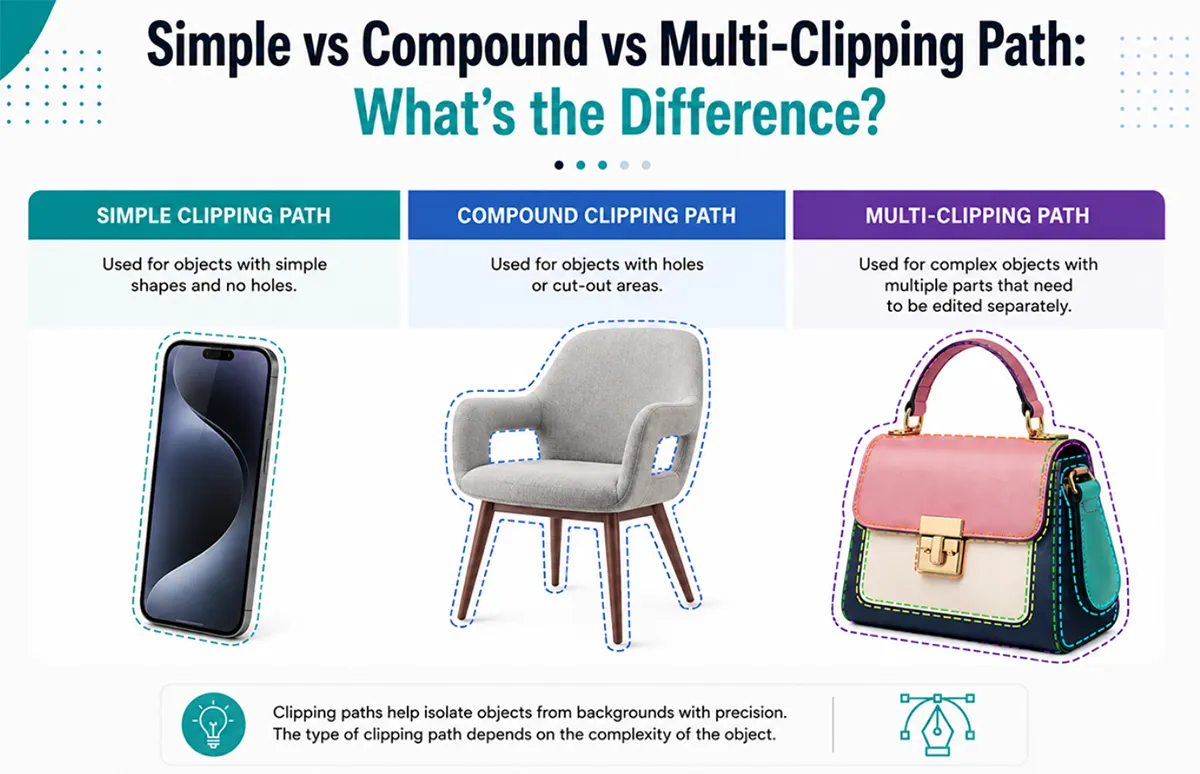
Commercial photographers rely on different types of clipping path techniques depending product type, shape, complexity and editing requirements. There are three primary types of image clipping that are widely used for editing commercial photographs:
- Simple Clipping Path
- Compound Clipping Path
- Multi-Clipping Paths
These terms often differ in terms of purpose and procedure for all groups involved with e-commerce photography, including retailers, photographer studios, Amazon sellers, and companies that heavily rely on product photos. In this guide, you'll learn how each clipping path technique works, where it is commonly used, and which method is best suited for different products and editing workflows.
Why Different Clipping Path Techniques Matter
In the field of eCommerce professional editing, accuracy involves more than simply separating the background from the subject. The editing technique has an impact on edge quality, product realism, flexibility of recoloring, control of shadows, accuracy of retouching, editing cost and turnaround time for example, a simple clipping path works perfectly for products such as bottles or boxes, anything that has internal spaces (such as jewelry or fashion accessories) will require a more sophisticated edit path structure to produce as desired.
Selecting an incorrect method can lead to obvious mistakes, including unnatural edges, filled-in holes, improper handling of transparency, or future limitations on editing flexibility.
As such, high-end cut-out companies categorize their clipping paths based on the image's complexity and the intended use of the cut-out image.
Simple Clipping Path
The most common method of manually creating a product cutout is to use a simple clipping path, which involves drawing a vector outline of the product without internal paths or separate layers.
Simple clipping paths produce the best results when the product has a smooth edge and uncomplicated shape. Because fewer anchor points need to be drawn and edited, the editing time will be faster and less expensive.
The kinds of products that are commonly cut out using simple clipping paths are as follows:
- Makeup
- Electronics
- Books
- Bottles
- Boxes
- Kitchen equipment
E-commerce businesses that process a large number of images typically use simple clipping paths for their products because they provide a clean cutout quickly and inexpensively.
Another reason simple clipping paths are often preferred is their consistency. Many online marketplaces, such as Amazon and Shopify, have strict requirements for a clean white background; a simple clipping path can help an e-commerce business meet these standards at no additional cost.
Unfortunately, simple paths do have limitations. They cannot be used on products with holes, transparent areas, hair, fur, or highly detailed surfaces. Therefore, applying a simple clipping path to a complex object often results in unnatural edges and lower-quality cutouts.
What Is a Compound Clipping Path?
There are instances when a product has internal gaps, holes, or open spaces that must remain transparent after removing the background; in these situations, a compound clipping path is necessary. A simple clipping path outlines the shape, while a compound clipping path includes multiple connected paths around internal and external (grouped) spaces within a single product.
Compound clipping paths are commonly used for products with holes, gaps, or open spaces, such as chairs, rings, handbags, bicycle frames, and lace-up shoes.
Without a compound path, holes and transparent openings may be incorrectly filled, creating an unrealistic cutout.
The primary purpose of a compound clipping path is to ensure accurate structure; this helps maintain the natural shape of products with open areas and prevents unrealistic cut-out results.
Developing compound clipping paths requires considerably more precision than simple path development because both external and internal path directions must be maintained accurately during editing. When compound clipping paths are improperly developed, visible editing errors typically occur, especially at corners and curved openings.
To avoid this issue, many professional editors will zoom in much deeper into the image and manually adjust the anchor points to create smoother curves and/or spacing that are aesthetically appropriate.
What Is a Multi-Clipping Path?
A multi-clipping path can be thought of as a method for performing more complex image editing, such as cutting out backgrounds and editing different sections of the same image individually.
For example, instead of drawing a single clipping path for the entire object, an editor will create multiple clipping paths for each section of the image, allowing them to edit each one separately.
Multi-clipping paths are very common in retouching higher-end retail images, especially for:
- Jewelry
- Fashion Products
- Furniture
- Luxury Accessories
- Catalog Photography
An example of a necklace image would consist of separate clipping paths for the following:
- Gold Metal
- Diamonds
- Reflections
- Shadows
Because each section is created separately, the editor can adjust the brightness, color, contrast, and texture of one section without affecting the others. This type of control greatly benefits brands that need multiple color options or quality retouching.
Because businesses can create multiple color variations of a product instead of shooting multiple photos, using multi-clipping paths lowers photography costs while providing consistent imagery across a large catalog of products.
However, multi-clipping paths require significantly more time to create than basic clipping paths and are not an easy process in Photoshop, as they require an experienced Photoshop editor.
Which Clipping Path Type Is Best for E-commerce?
Every product category requires specific editing techniques. For companies selling common consumer products with clean outlines, a simple clipping path is the most efficient way to create images for a business because it's fast to execute, inexpensive to produce, and ideal for high-volume image processing.
For products with features like handles, gaps, lace, or hollow areas, compound clipping paths will ensure visual accuracy and realistic transparency.
When brands retouch their products, perform color correction, or change product colors, multi-clipping paths are an ideal technique. Fashion and jewelry brands benefit especially from multi-clipping paths, as it allows for high levels of detail and precision.
As online commerce grows, consistency in the visual representation of products is critical to establishing trust with customers. Using the right type of clipping path will result in clean images of final products, accurate colors, and uniformity across stores.
Common Mistakes Businesses Make
One common mistake is using simple clipping paths on products that require more advanced path structures for reducing editing costs. Businesses will usually use overly simple clipping paths, resulting in low edge quality, unrealistic transparency handling, and lower overall image professionalism.
Another frequent issue is the overreliance on fully automated AI photo background removal tools for highly complex product photography. Although AI photo background removal technology has improved significantly, it is still not very effective with reflective surfaces, very intricate, detailed jewelry, transparent materials, or fine product edges.
In addition to these issues, many businesses fail to recognize the importance of having flexibility with future editing. Many brands request only background removal, only to later find they need recoloring, shadow adjustments, or advanced retouching; without multiple clipping paths, this process will take much longer and be much more tedious.
Why Professional Editors Still Prefer Manual Clipping Paths
Although there has been a rise in the use of artificial intelligence (AI)- based image-editing applications, professional e-commerce image editing still requires that all clipped paths be created manually. Expert editors ensure clean curves, natural product shapes, accurate edges, better consistency with bulk images. These issues are particularly relevant when editing high-resolution product photography, as even slight imperfections can become significant in an e-commerce environment.
In addition to these benefits, manually edited images will also give the editor greater control over shadow preservation, product depth, and realistic cutout quality, all of which contribute to the overall quality of the online retailer.
Final Thoughts
Using a Simple Clipping Path means you have a single continuous outline around your image to separate it from the background and create an ideal cutout for a simple product.
A Compound Clipping Path can allow for cutouts of products that may include multiple holes or areas where a product's outline does not completely enclose the product itself; it will include both the outer edge of each hole and the area surrounding them.
A Multi-Clipping Path allows you to add unlimited outlines/shapes around any combination of multiple objects simultaneously, so that the resulting edits can be performed at one time without having to repeat steps for each object separately.
Professionally edited product images are essential to maximizing your company's ability to drive conversions. The right technique will not only improve the quality of your image(s) but also enable you to create an effective, scalable approach and continue growing over the long term. When to Use Compound Vs. Multi-Clipping Path
The difference between the two is that a compound clipping path holds the holes or the gaps in an object (such as a donut shape). In contrast, a multi-clipping path allows editing for different sections of an image separately (for example, color changing or advanced retouching).
Multi-Clipping Path Is Best for Jewelry Editing
Multi-clipping paths will generally give the best outcome regarding editing jewelry. The individual/separate paths allow for color or surface changes on gemstones and on the metal surface, as well as reflections and shadows.

Asha is working as a Creative Director at Clipping Mask Asia. She has completed her Graduation from the University of Dhaka inFilm and Television Studies. She has vast knowledge in Photography, Videography, Video Editing, 3D Modeling, Rendering and Animation. She loves to explore the creative world with her academic knowledge, experience and creative mind. She writes creative blogs on design, illustration and editing for renowned brands like Clipping Mask Asia.